18 Nov
The short answer: Local Services Ads charge you per lead and sit at the very top of local searches with a verified badge. Google Search ads charge per click and give you control over keywords, ad copy and the page people land on. Most contractors should start with Local Services Ads if their trade qualifies, then add Search ads to cover profitable services and searches Local Services Ads don’t reach. Either one only pays off if someone answers the phone.
What Local Services Ads are
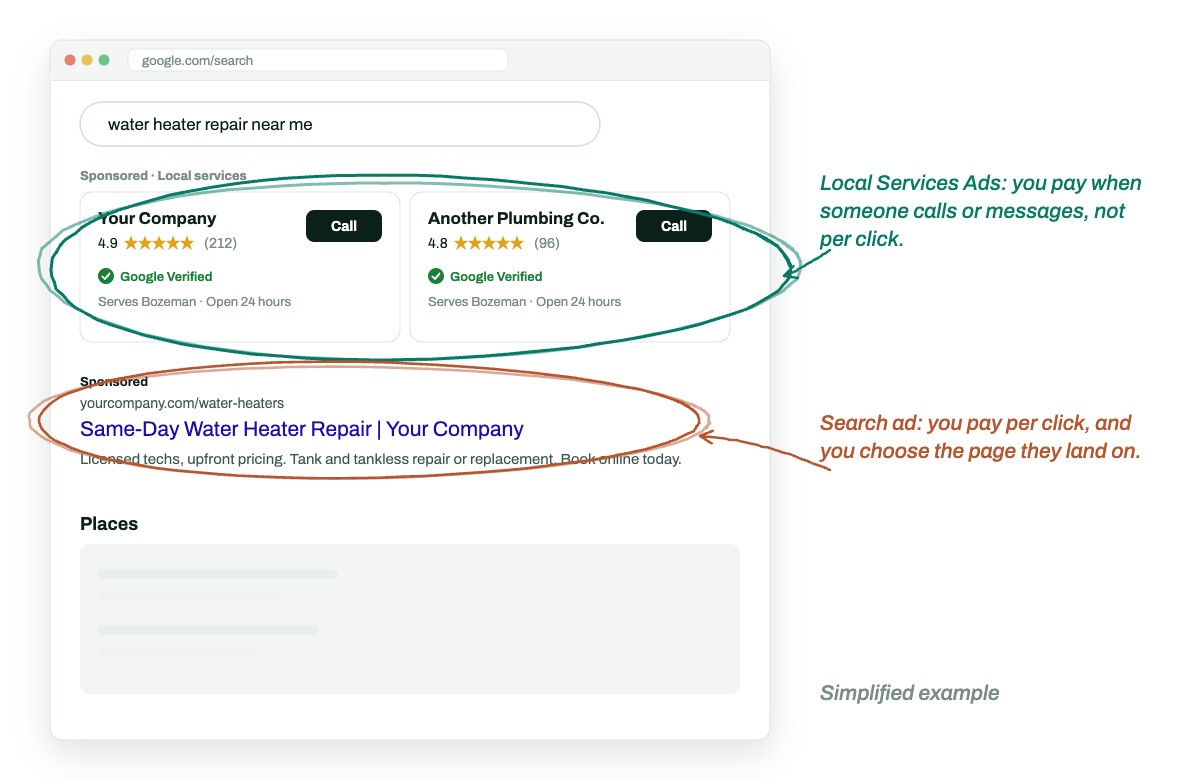
Local Services Ads are the listings at the top of searches like “roofer near me” or “electrician” with a verified badge, star rating and phone button. You don’t pick keywords or write ads. Google decides when to show you based on your service categories, service area and profile.
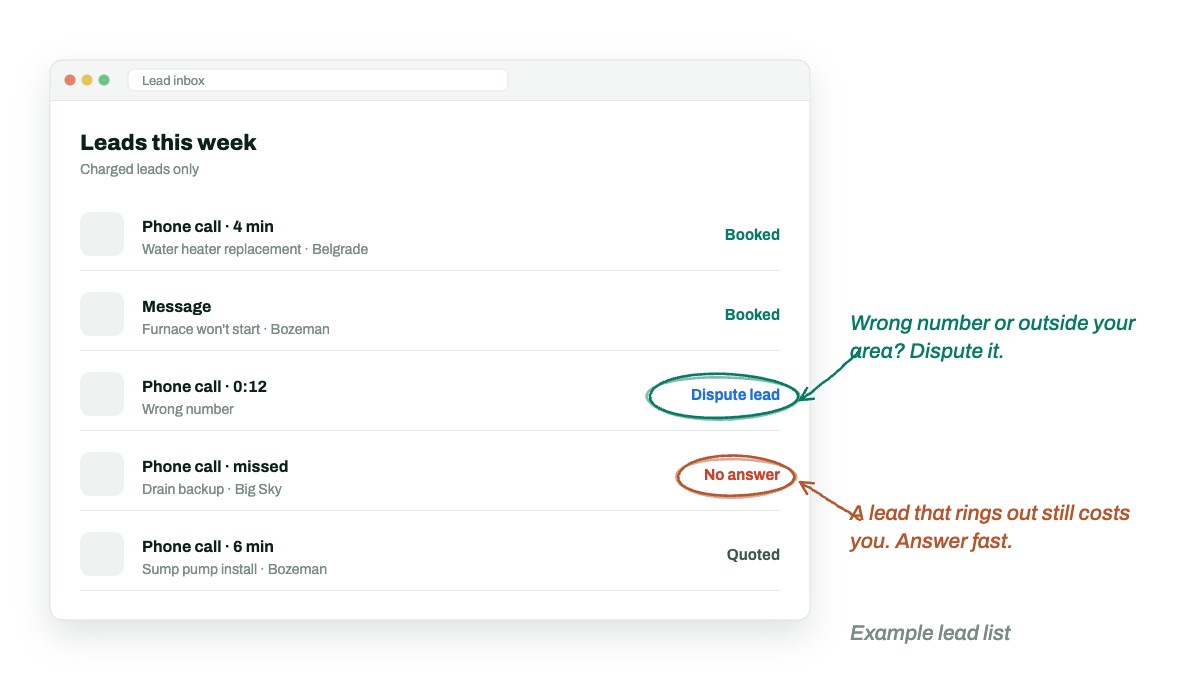
The key difference is how you pay. According to Google’s Local Services help, you pay when you get a lead, meaning a call, message or booking request from a potential customer, not when someone clicks. You set a bid, either as a target cost per lead or a maximum you’re willing to pay, and Google lets you dispute leads that aren’t valid, like wrong numbers or jobs outside your area.
To qualify, your business has to pass Google’s verification checks, which can include background, license and insurance checks depending on your trade and location. Your reviews and how quickly you respond also affect how often you show up.
One change to know about: in 2026 Google began moving Local Services campaigns into the main Google Ads platform as a pay-per-lead campaign type, starting with selected U.S. businesses. Pay-per-lead billing and the top-of-page placement are staying. If your account hasn’t moved yet, expect a notice from Google before it does.
What Google Search ads are
Search ads are the text ads that appear above and below the regular results. You choose the keywords, write the headlines and descriptions, set your budget and decide which page each ad sends people to. You pay each time someone clicks.
That control is the advantage. You can:
- Target specific high-value jobs, like “metal roof installation” or “panel upgrade.”
- Send each ad to a matching service page instead of your homepage.
- Run ads only during the hours your office can answer.
- Exclude searches you don’t want, like “DIY” or “jobs.”
The trade-off is that clicks cost money whether or not the person calls. A Search campaign needs good landing pages and steady management to stay profitable.
Side by side
- How you pay: Local Services Ads charge per lead. Search ads charge per click.
- Placement: Local Services Ads appear at the very top for qualifying searches. Search ads appear above and below organic results.
- Control: Local Services Ads choose searches for you based on your categories. Search ads let you pick keywords and write the copy.
- Trust signal: Local Services Ads show a verified badge and your reviews. Search ads rely on your copy and extensions.
- Where people go: Local Services Ads usually lead to a call or message from your profile. Search ads send people to the page you choose.
- Setup: Local Services Ads require verification first. Search ads can start as soon as the campaign is built.
When to use Local Services Ads
- Your trade is eligible in your area, such as plumbing, HVAC, electrical, roofing and many other home services.
- You want leads without managing keywords and ad copy.
- You have a solid review count, or a plan to build one, since reviews affect how often you appear.
- Someone can answer calls and messages quickly during the hours you run.
When to use Search ads
- You want more of a specific, high-margin job than Local Services Ads deliver.
- You have strong service pages built to turn visitors into calls.
- Your trade isn’t eligible for Local Services Ads in your area.
- You want to show up for searches Local Services Ads don’t cover, like research-stage searches about a specific product or install.
Why many contractors run both
The two formats don’t compete as much as you might think. Local Services Ads catch the “I need someone now” searches. Search ads let you go after the specific jobs you want more of and send people to a page built to convert. Running both, with every lead tracked to its source, shows you which one books jobs at a lower cost.
Measure cost per booked job, not cost per lead
A cheap lead that never books is expensive. A pricier lead that turns into a $12,000 roof is a bargain. Track each lead from source to booked job to invoice, and judge every channel by what a booked job costs.
The biggest factor is speed. With pay-per-lead ads, a lead that rings out or waits hours for a callback still costs you. Missed-call text-back and instant replies protect what you’re paying for.
Local Services Ads checklist
- Confirm your trade and service area are eligible.
- Complete Google’s verification steps early, since they can take time.
- Build your review count before you scale your budget.
- Set the hours you run to match when your office can answer.
- Dispute leads that aren’t valid.
- Track every lead to a booked job and invoice.
Local Services Ads questions
How much does a Local Services Ads lead cost?
Google doesn’t publish a fixed price. The cost depends on your trade, your location, the type of lead and how you bid. A busy metro area usually costs more per lead than a small town.
Do I need a website for Local Services Ads?
Not technically, since leads come through your Google profile. But customers will often look you up before they call back or approve a quote, and a professional website helps close the job.
Can I run Local Services Ads and Search ads at the same time?
Yes. Many contractors do, and the two can show on the same results page. Track them separately so you can see which one produces booked jobs at the better cost.
Not sure which ads fit your company? Our paid ads management team sets up and manages Local Services Ads and Google Search campaigns for trade and home service companies, with every lead tracked to its source. Book a free 20-minute growth audit.