19 Nov
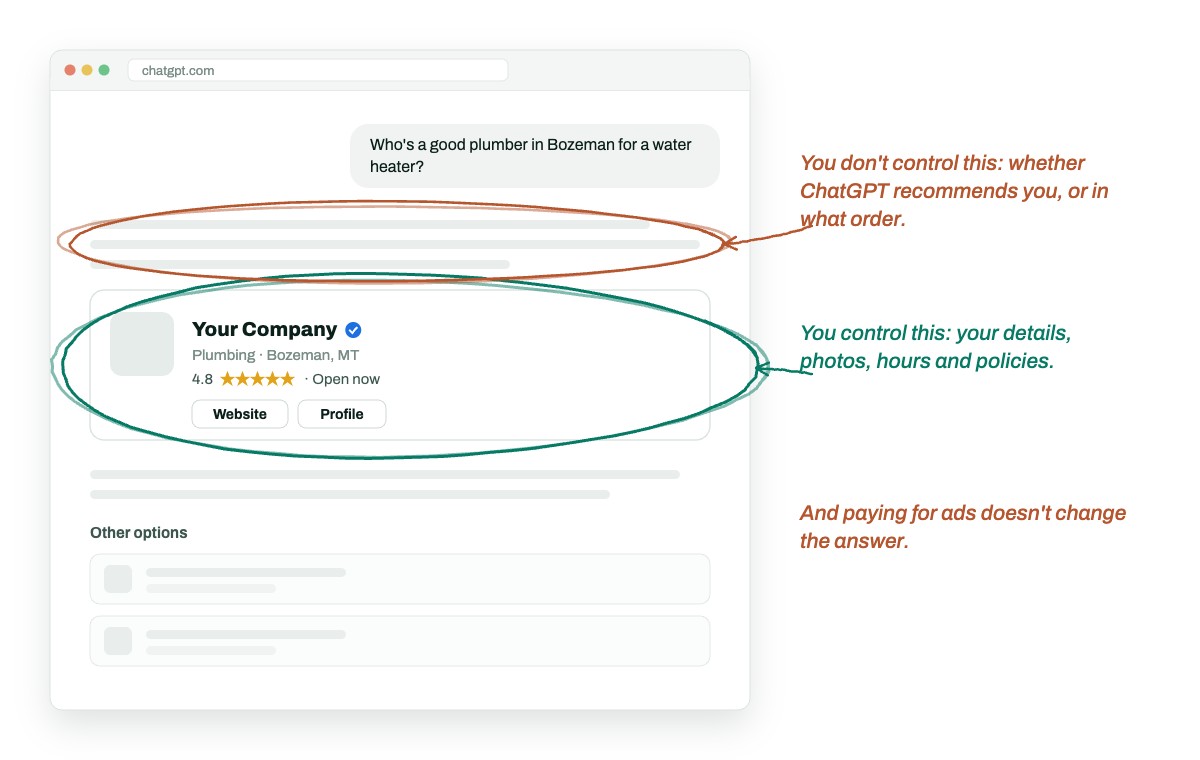
The short answer: On November 10, 2026, OpenAI launched Businesses in ChatGPT, a free beta that lets you claim your business profile inside ChatGPT through a dashboard called Business Hub. Claiming lets you correct what ChatGPT shows about you and see how often it mentions your business. It doesn’t buy you a better spot in ChatGPT’s recommendations. Claim it, fill it out carefully, make sure ChatGPT can actually read your website, and keep doing the work that earns mentions in the first place.
What OpenAI launched
Businesses in ChatGPT has three parts:
- Business Hub: the dashboard where you claim, verify and manage your business. It lives at chatgpt.com/business-hub and in the ChatGPT sidebar.
- Business profiles: the listing people can open when your business shows up in a ChatGPT answer. Once you’re verified, you can update the details on it.
- Business Agents: a labeled chat that answers customer questions using information you provide. For now, these are limited to eligible U.S. ecommerce and online service businesses.
Claiming and managing a profile is free. OpenAI says the program reaches the 1.2 billion people who use ChatGPT each week. It works a lot like a Google Business Profile, but inside ChatGPT. You can read OpenAI’s announcement and its setup guide.
One naming note: this is not the same as “ChatGPT Business,” which is a paid workspace plan for teams. You don’t need any paid plan to claim your profile.
Who can claim a profile right now
- Online businesses with a website can claim an existing listing and may be able to add a new one.
- Local storefronts, like shops and restaurants, can currently claim only a listing ChatGPT already has, and only in the U.S.
- Service businesses such as contractors, law and dental practices, outfitters and lodges should search for their listing first. If you’re not listed yet, focus on the visibility steps below and check back, since OpenAI says more categories and markets are coming.
OpenAI hasn’t published a full list of eligible categories and may decline some businesses during the beta.
How to claim your business in ChatGPT, step by step
Before you start, gather your government-issued ID, your business registration details, and access to your business phone, business email or website DNS settings. Make sure your business name, address and phone number match your website and Google Business Profile exactly.
- Check what ChatGPT says today. Ask ChatGPT about your business the way a customer would, such as your name plus your town, or “best [service] near [town].” Note anything wrong or missing.
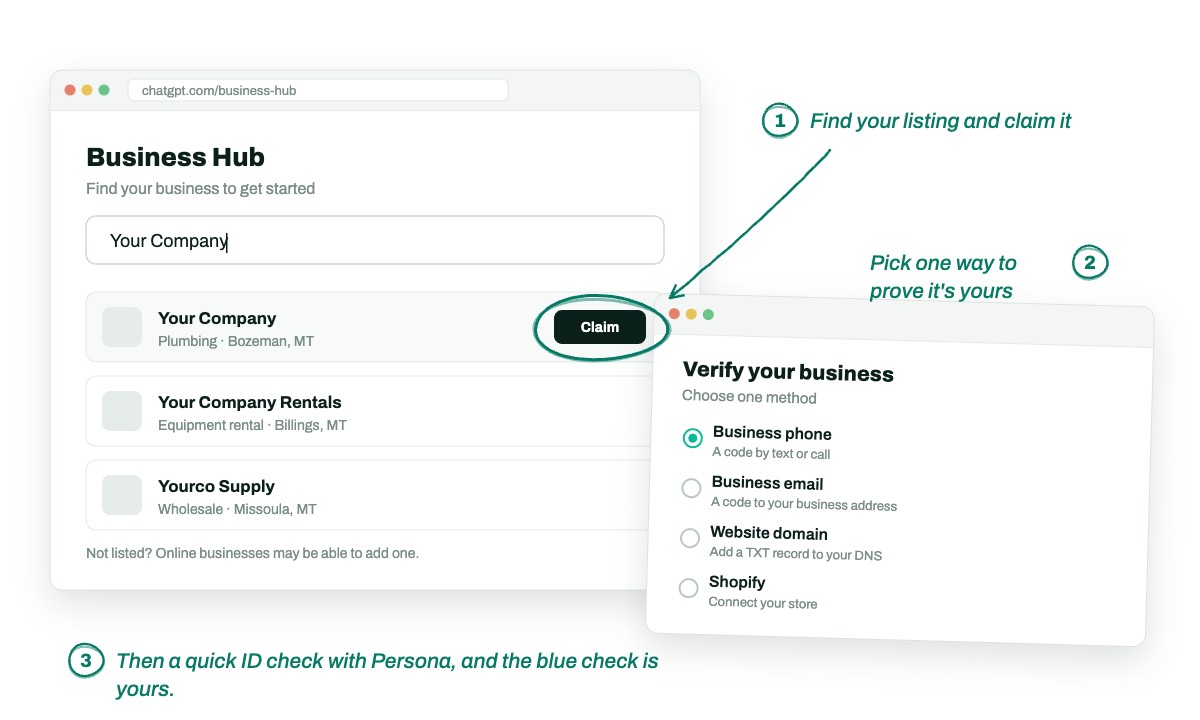
- Open Business Hub. Sign in with the ChatGPT account you want to manage the listing with, then go to chatgpt.com/business-hub and search for your business by name.
- Select your listing and verify the connection. Choose one method: a code sent to your business phone, a code sent to your business email, a TXT record added to your domain’s DNS, or a Shopify connection for Shopify stores.
- Complete the identity check. OpenAI uses Persona to confirm you’re authorized to act for the business. Expect to provide a government-issued ID, and make sure your details match official records. Verified profiles get a blue check.
- Fill out your profile. Update your website, description, category, logo, photos, contact details, location and hours. Every change is reviewed and can take time to appear.
- Add teammates or your agency. Use the Invite option so others can help manage the profile from their own ChatGPT accounts.
A word of caution from early setup guides: profiles published through verification can’t be deleted, so double-check every detail before you submit.
Write your profile the way customers search
Business Hub gives you less room than Google. Early testers report one category and a description capped at 300 characters, and the business name can’t be edited in the dashboard. Make every word count:
- Pick the most specific category that matches your main service.
- Write a plain description that names what you do, who you serve and where. For example: “Family-owned plumbing and HVAC company serving Bozeman, Belgrade and Big Sky. Water heaters, furnaces, AC and 24/7 emergency repair.” Or for an outfitter: “Guided float trips and lodge stays on the Madison and Yellowstone rivers, May through October, for beginners through experts.”
- Use real photos of your work, team, location or trips. The first photo becomes your cover image.
- Keep hours and contact details identical to your website and Google Business Profile.
Make sure ChatGPT can read your website
This is the step most guides skip, and it matters more than the profile itself. ChatGPT pulls information about your business from your website and other sources, not just your profile. If your site blocks OpenAI’s crawlers, ChatGPT has less to work with.
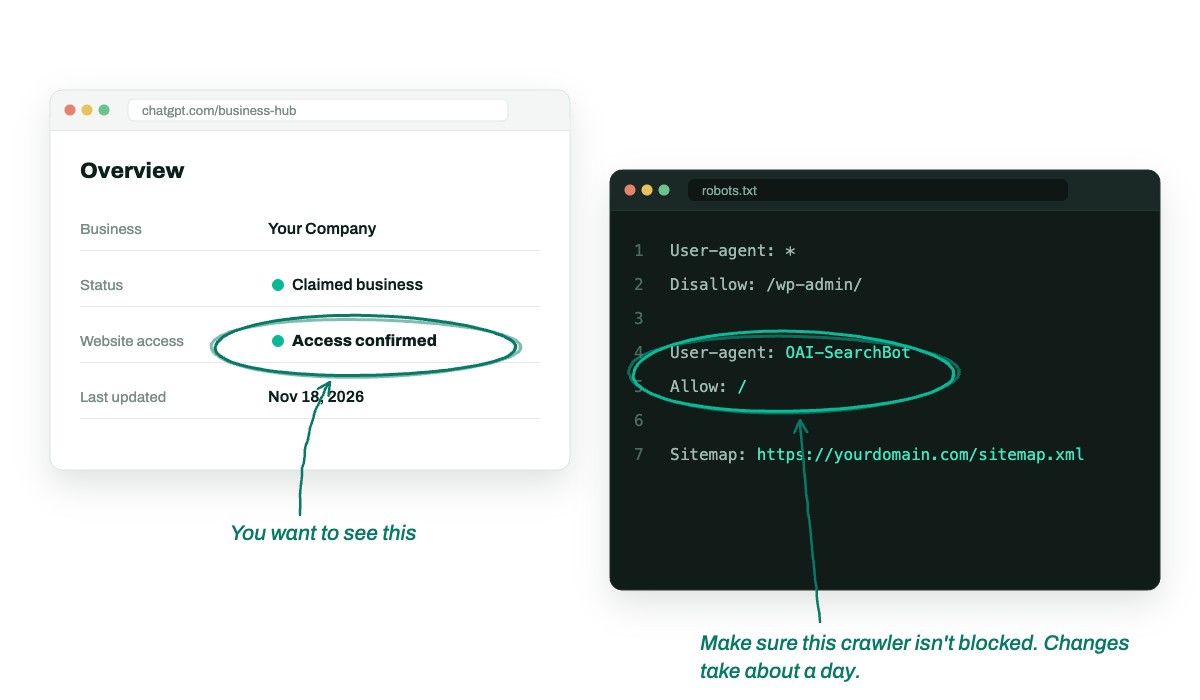
- Check the Website access status on your Business Hub overview. You want to see “Access confirmed.”
- Check your robots.txt file at yourdomain.com/robots.txt. OpenAI recommends allowing OAI-SearchBot, the crawler behind ChatGPT search, if you want your site to appear in results. Make sure it isn’t blocked by a broad rule or a security firewall.
- Allow time for changes. OpenAI says robots.txt changes for search can take about 24 hours to take effect.
If you’re not sure how your site is set up, ask whoever manages your hosting or website. It’s usually a five-minute check.
What Business Hub won’t do
It’s easy to read the launch as “pay attention to this or disappear.” The reality is more measured:
- Claiming doesn’t guarantee visibility. OpenAI says a profile doesn’t give you direct control over ChatGPT’s independent recommendations, and ChatGPT may still use other sources when describing your business.
- Paying doesn’t change answers. OpenAI says advertising doesn’t affect ChatGPT’s answers. Sponsored placements are labeled.
- Business Agents can’t take bookings. Where they’re available, agents can answer questions, compare options, explain policies and link to your site, but they can’t complete a purchase or look up an order. They must say they’re an AI representing your business, and they can’t give advice that requires a professional license.
- Insights are directional. You’ll see mentions, profile views, website clicks and discovery topics for the last 7 or 28 days. OpenAI notes that clicks don’t confirm website visits, and small numbers may not show at all.
How to get mentioned more often
ChatGPT recommends businesses it can understand and trust from what’s published about them. The work that helps is the same work that helps you on Google:
- A clear website with a page for each service, trip, location or practice area, written in the words customers actually use.
- Consistent details everywhere, including your name, address, phone and hours on your site, Google Business Profile and directories.
- Steady, recent reviews on Google and the platforms your customers use.
- Mentions on other trusted sites, such as local news, chambers of commerce, industry associations, tourism boards and partner businesses.
- Answers to real questions, like pricing ranges, what’s included, how booking works and what to expect, published on your site.
Then use the discovery topics in Business Hub to see which themes ChatGPT connects to your business, and fill the gaps on your website.
Don’t forget Google’s AI results
ChatGPT isn’t the only AI answer engine your customers use. Google’s AI Overviews and AI Mode appear right in search results, and there’s nothing extra to claim there. Two things matter:
- Your Google Business Profile. Keep it complete and current: services or trip types, season dates, hours, fresh photos and recent reviews. It’s still the most important local listing you have.
- How your ads are set up. Existing Search campaigns can show ads above and below AI Overviews. To show ads inside AI Overviews and in AI Mode, Google requires broad match keywords or its automated campaign types, such as Performance Max or AI Max for Search. Campaigns built only on exact-match keywords aren’t eligible for those spots. If you run ads, ask your ad manager which setup you have.
Business Hub checklist
- Ask ChatGPT what it says about your business today.
- Match your name, address, phone and hours across your site and Google profile.
- Claim your listing at chatgpt.com/business-hub and complete verification.
- Choose the most specific category and write a 300-character description.
- Upload real photos and confirm your hours and contact details.
- Confirm “Website access” and allow OAI-SearchBot in robots.txt.
- Invite your team or agency.
- Review insights monthly and update your website based on discovery topics.
Businesses in ChatGPT questions
Is it free to claim my business in ChatGPT?
Yes. Claiming, editing your profile and viewing insights are free. Sponsoring a Business Agent through ChatGPT ads is paid.
Can my local service business claim a profile?
If ChatGPT already lists your business, search for it in Business Hub and claim it. Local storefronts can currently claim only existing U.S. listings. If you’re not listed, strengthen your website and Google Business Profile so ChatGPT has accurate information to draw from.
Will claiming my profile get me more customers?
Not on its own. It helps ChatGPT describe you accurately and gives you data on how often you’re mentioned. Getting recommended still depends on your website, reviews and reputation across the web.
Should I use a Business Agent?
If you’re an eligible U.S. ecommerce or online service business, it can answer pre-sale questions around the clock. Write clear instructions, test it with real customer questions, and keep it consistent with your website and policies.
Want help getting found in ChatGPT and on Google at the same time? Our SEO team handles Business Hub setup, website access checks and the content that earns mentions, all tracked in one monthly report. Book a free 20-minute growth audit.